背景
其实来自于AWS health dashboard中的这么一条报警
1 | StorageGateway security notification |
表示我现在用的storage gateway有一些文件上传失败了,需要查看并解决
解决方案
查看storage gateway问题

可以看到有个提示说上传有问题,建议创建cache report
S3 文件网关可以为当前位于特定文件共享的本地上传缓存中的文件生成元数据报告。您可以应用筛选器和其他标准来确定哪些特定类型的缓存文件出现在报告中。您可以使用此报告来帮助识别和解决网关问题。例如,如果您无法将文件从网关上传到 Amazon S3,则可以生成一份报告,列出上传失败的具体文件以及上传失败的原因。该报告是一个 CSV 文件,其中包含与您指定的筛选参数集匹配的文件列表。输出文件作为 Amazon S3 对象存储在您在配置报告时指定的存储桶位置。
创建cache report
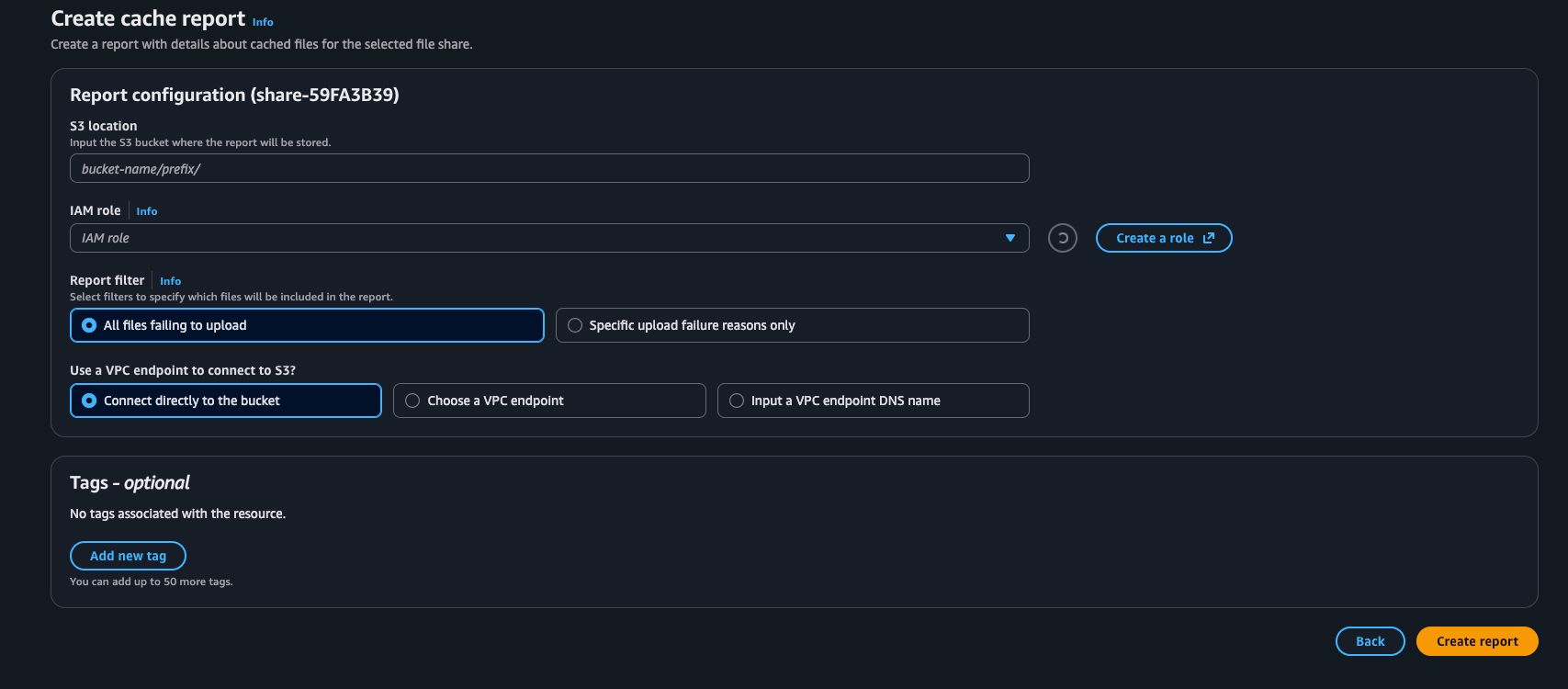
可以看到,我们需要一个IAM role以及一个S3 bucket来存放report
IAM Role
role需要配置以下trust relationship
1 | { |
以及以下权限策略
1 | { |
Report Filter
filter这边有两个选项
| 选项 | 含义 | 适用场景 |
|---|---|---|
| All failing uploads | 包含所有上传失败的文件(不论失败原因) | 适用于你要全面排查上传异常的情况(推荐第一次排查时使用) |
| Subset by specific reasons | 仅包含指定失败原因的文件 | 适用于你想聚焦某类问题(例如只看 InvalidObjectState 或 AccessDenied)时使用 |
四种错误解释及可能原因
| 失败原因 | 含义 | 可能原因 |
|---|---|---|
| Inaccessible storage class | 网关无法访问对象的存储类别 | 目标对象在 Glacier / Glacier Deep Archive,需要恢复后才能访问 |
| Invalid object state | 文件在本地和 S3 上的状态不一致 | 对象可能被冻结、被替换、被部分上传或元数据不同步 |
| Object missing | 对象在 S3 上被删除或移动 | 可能有人在 S3 控制台或 CLI 中手动删除了对象 |
| S3 Access Denied | 网关的 IAM 角色没有上传权限 | 可能是 IAM Role 缺少 s3:PutObject 或 s3:ListBucketMultipartUploads 权限 |
选择建议
| 目的 | 推荐 Filter |
|---|---|
| 想全面了解有哪些上传失败的文件 | All failing uploads |
| 只想排查“InvalidObjectState”类问题(最常见) | 选择 Subset → Invalid object state |
| 只想确认权限问题 | 选择 Subset → S3 Access Denied |
创建之后大约1-5分钟就可以在S3中看到一个csv文件,那个就是report
cache report解读
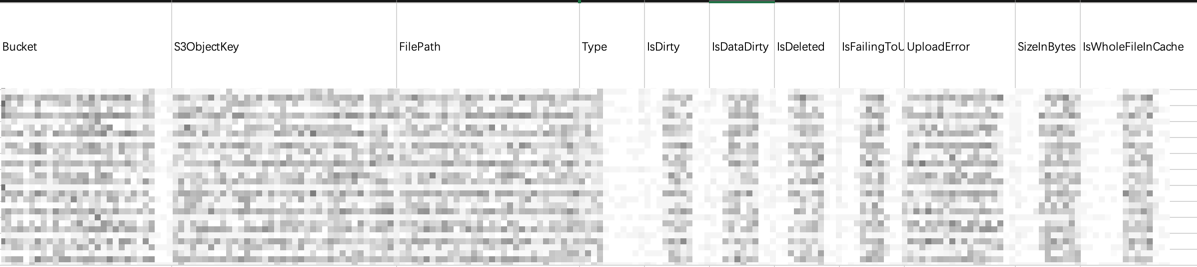
字段详解
| 字段名 | 含义 | 典型取值 | 说明与重点 |
|---|---|---|---|
| Bucket | 目标 S3 Bucket 名称 | xxx-s3 |
表示该文件最终应写入的 S3 bucket。 |
| S3ObjectKey | 在 S3 中的对象路径(Key) | aaa/bbb/cb/... |
对应 S3 中的对象键。可直接在 S3 控制台搜索此 Key 验证文件是否存在。 |
| FilePath | Gateway 本地挂载点中的文件路径 | /mnt/share/aaa/bbb/cb/... |
指文件在本地网关中的路径。用于定位本地缓存的文件。 |
| Type | 文件或目录类型 | File / Directory |
通常为 File。如果是 Directory,就代表目录项(不会上传)。 |
| IsDirty | 文件是否有尚未上传到 S3 的更改(数据或元数据) | true / false |
如果为 true,说明该文件在本地有修改但还没完全同步到 S3。 |
| IsDataDirty | 文件数据部分是否未上传完成 | true / false |
比 IsDirty 更具体,只表示文件内容(数据块)未同步。 |
| IsDeleted | 文件是否已在本地删除但还没同步到 S3 | true / false |
若为 true,S3 上可能还保留旧文件。 |
| IsFailingToUpload | 是否在上传至 S3 时发生错误 | true / false |
🚨 如果为 true,就是关键字段 —— 表示该文件上传失败。 |
| UploadError | 上传失败的具体错误类型 | 例如:InvalidObjectState, AccessDenied, EntityTooLarge |
可直接用来判断原因。和你 CloudWatch Log 中的错误字段一致。 |
| SizeInBytes | 文件大小 | 例如 6345721 |
可帮助确认是否属于 “>6MB metadata update bug” 范围。 |
| IsWholeFileInCache | 文件是否完整保存在 gateway cache 中 | true / false |
如果为 false,说明只缓存了部分文件内容。重新上传时可能需要重新拉取。 |
解析
IsDirty = TRUE 且 IsDataDirty = FALSE
表示文件的“元数据”(如时间戳、权限)在本地已更新,但文件内容没有变化。
🔹说明该文件的内容没问题,但元数据更新没能上传成功。
具体错误可参考: https://docs.aws.amazon.com/filegateway/latest/files3/troubleshooting-file-gateway-issues.html#troubleshoot-logging-errors-invalidobjectstate