AWS使用日志4--使用EventBridge+Lambda+Config+SNS监控ACM证书过期
背景
通常在AWS中,如果我们需要监控单个ssl证书的过期时间,我们直接用cloudwatch即可,但是如果我们是control tower控制的,拥有几百个账号,那么这时候一个个手动创建cloudwatch就显得非常费时费力了,那么有没有办法直接一次性监控证书的有效期呢?
方法自然是有的,这里推荐一种非常简单的方法,即使用config查询所有账号的有效期
原理
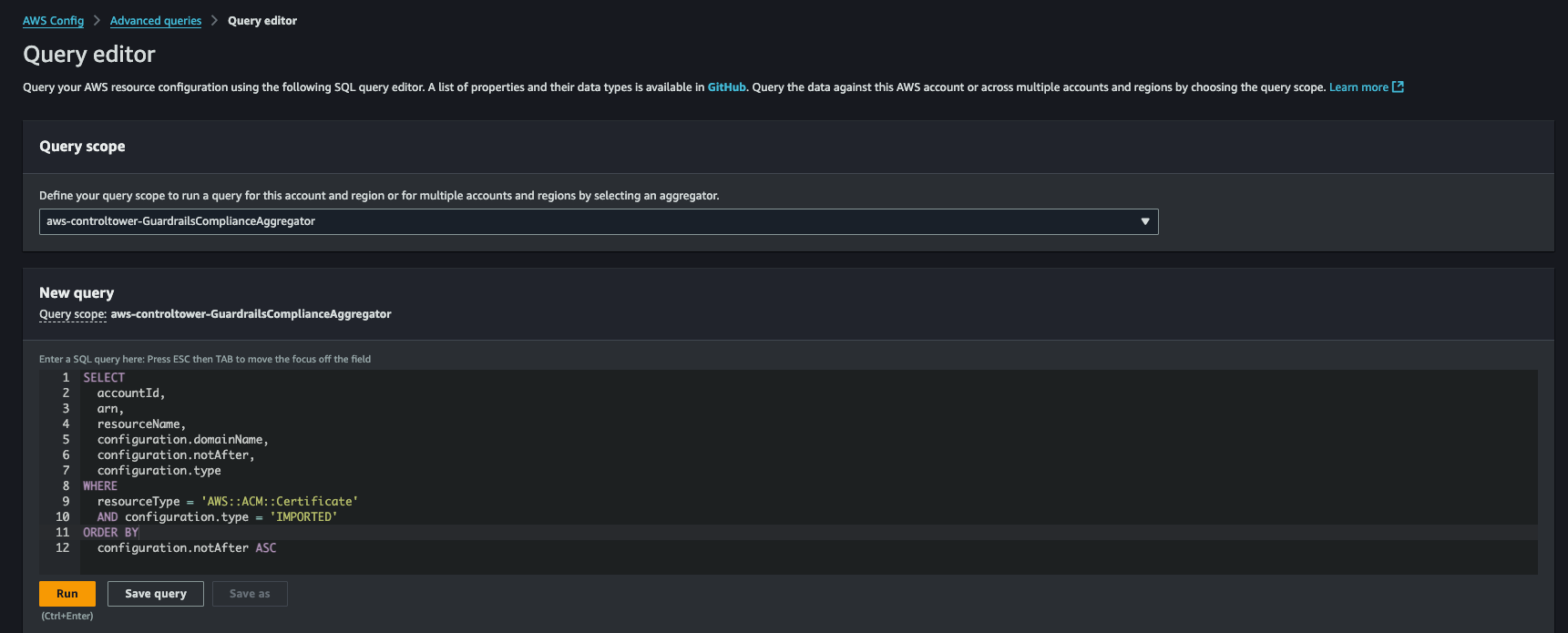
原理其实非常简单,众所周知audit账号不仅能查看自己的AWS Config配置,同样也能够通过聚合器查看其他账号的Config合规性,这里我们使用默认的aws-controltower-GuardrailsComplianceAggregator即可查询到所有的账号的ACM合规性
也可以在Config中先用advanced queries去验证查询语句的正确性
实现
1
2
3
4
5
6
7
8
9
10
11
12
13
14
15
16
17
18
19
20
21
22
23
24
25
26
27
28
29
30
31
32
33
34
35
36
37
38
39
40
41
42
43
44
45
46
47
48
49
50
51
52
53
54
55
56
57
58
59
60
| import boto3
import datetime
import json
import os
AGGREGATOR_NAME = "aws-controltower-GuardrailsComplianceAggregator"
SNS_TOPIC_ARN = os.environ.get("SNS_TOPIC_ARN")
def lambda_handler(event, context):
config_client = boto3.client("config")
sns_client = boto3.client("sns")
date_limit = (datetime.datetime.utcnow() + datetime.timedelta(days=30)).date().isoformat()
expression = f"""
SELECT accountId, arn, resourceName, configuration.domainName, configuration.notAfter, configuration.type
WHERE resourceType = 'AWS::ACM::Certificate'
AND configuration.notAfter <= '{date_limit}'
AND configuration.type = 'IMPORTED'
ORDER BY configuration.notAfter ASC
"""
try:
response = config_client.select_aggregate_resource_config(
Expression=expression,
ConfigurationAggregatorName=AGGREGATOR_NAME
)
results = [json.loads(record) for record in response.get("Results", [])]
print("查询结果:")
for item in results:
print(item)
if len(results) > 1:
message = "以下 ACM 证书将在 30 天内过期(仅限 IMPORTED 类型):\n"
for cert in results:
message += f"- Account: {cert['accountId']}, Domain: {cert.get('configuration.domainName')}, Expire: {cert['configuration.notAfter']}\n"
sns_client.publish(
TopicArn=SNS_TOPIC_ARN,
Subject="ACM 证书过期提醒",
Message=message
)
print("SNS 已发送")
return {
"statusCode": 200,
"body": results
}
except Exception as e:
print(f"查询失败: {e}")
return {
"statusCode": 500,
"body": str(e)
}
|
注意事项
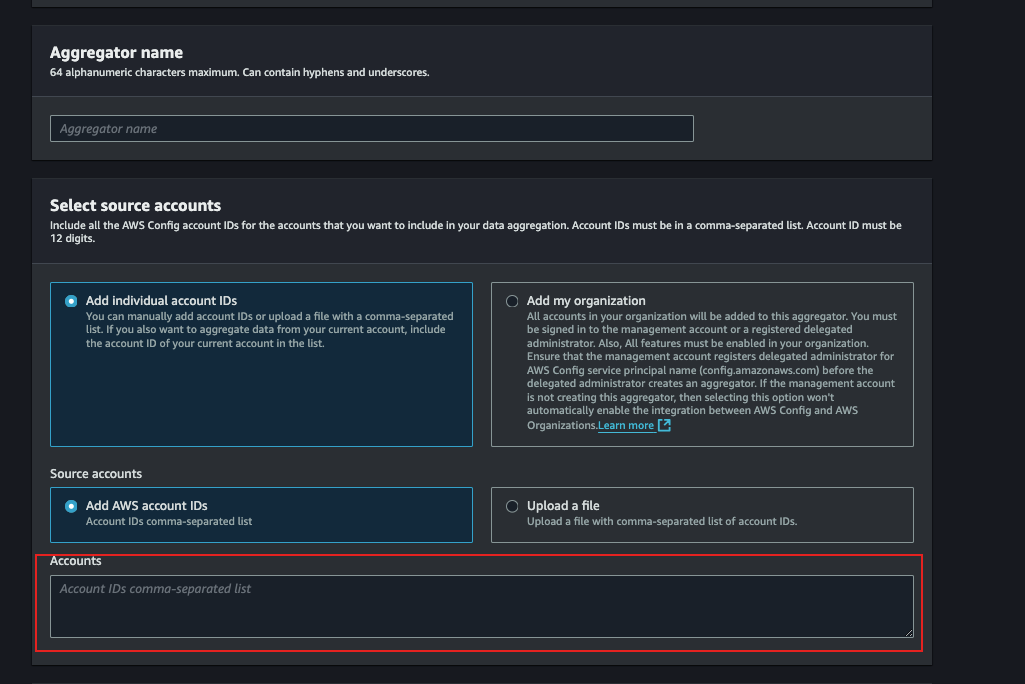
上文也说啦,我们用的是aws-controltower-GuardrailsComplianceAggregator这个,但是需要注意这个聚合器的账号范围,因为默认会把所有的账号都包括进来,包括UAT等环境,所以如果我们只需要监控Prod环境,那么最好的办法就是新建一个聚合器,然后在Source Accounts里面限定账号范围
前Android/Vue开发,现Infra从业人员,主营监控/AWS